Wi-Fi 7 in the Enterprise: What's Actually Worth Your Attention
A no-fluff look at what 802.11be introduces under the hood, Multi-Link Operation, preamble puncturing, 320 MHz channels, and where it matters for enterprise deployments in 2026.
If you’ve been in networking long enough, you’ve developed a reflex for filtering out Wi-Fi generation marketing. Every few years, a new number gets stamped on the box, the theoretical maximum throughput goes up by a factor that has no relationship to anything a real device will ever achieve, and someone in procurement asks whether it’s time to refresh the APs. Usually the honest answer is “probably not yet.” Wi-Fi 6 was a legitimate step forward. Wi-Fi 6E added a new band. Neither one was the revolution the press releases described.
Wi-Fi 7 is a little harder to dismiss, and the reason isn’t the throughput numbers. It’s that 802.11be changes something at the MAC layer that no prior generation touched — the assumption that a wireless client is associated to exactly one radio link at a time. That change, called Multi-Link Operation, has real implications for the kinds of problems enterprise wireless teams actually spend their time dealing with. The rest of what Wi-Fi 7 introduces, the 320 MHz channels, the upgraded modulation, the improved OFDMA — that’s incremental improvement on a familiar axis. MLO is something different, and it’s worth understanding on its own terms before you decide whether any of this matters for your environment.
Why the single-link assumption was always a bottleneck
Every Wi-Fi generation from 802.11a through Wi-Fi 6E operated under the same basic rule: a client device picks a band, associates to an AP on that band, and communicates on that single link until something forces a change. The AP might try to steer the client to a different band if things got congested, but that steering required breaking the existing association and forming a new one. Even when it worked smoothly, there was a gap. Applications noticed. A VoIP call would glitch. A real-time dashboard would miss a refresh. In environments where roaming or band transitions happened frequently, that gap was a chronic source of complaints that was difficult to diagnose and even harder to explain to someone who just noticed their call dropped for a second.
The fundamental issue is that forcing a client to live on a single link means the network has no way to gracefully balance a connection across available spectrum. If the 6 GHz band is clean but a burst of background traffic is saturating it, a sensitive application that also needs 6 GHz is stuck waiting. The AP can’t move just that application’s traffic to 5 GHz without losing the 6 GHz association entirely.
Wi-Fi 7 fixes this at the architecture level. An 802.11be access point and a compatible client negotiate what’s called a Multi-Link Device relationship, where the client maintains simultaneous associations on multiple bands through a single logical MAC address. Traffic can be distributed across those links dynamically — latency-sensitive packets go out whichever path has the least contention right now, bulk transfers fill the available capacity on both, and if one band has a problem the other picks up without any re-association event at all. From the application’s perspective, the connection is continuous and behaves more like wired Ethernet than it does like previous generations of Wi-Fi. That’s not a throughput improvement, it’s a reliability and consistency improvement, and those are the things that actually matter in an enterprise environment running real-time collaboration, voice, and increasingly AR-based workflows.
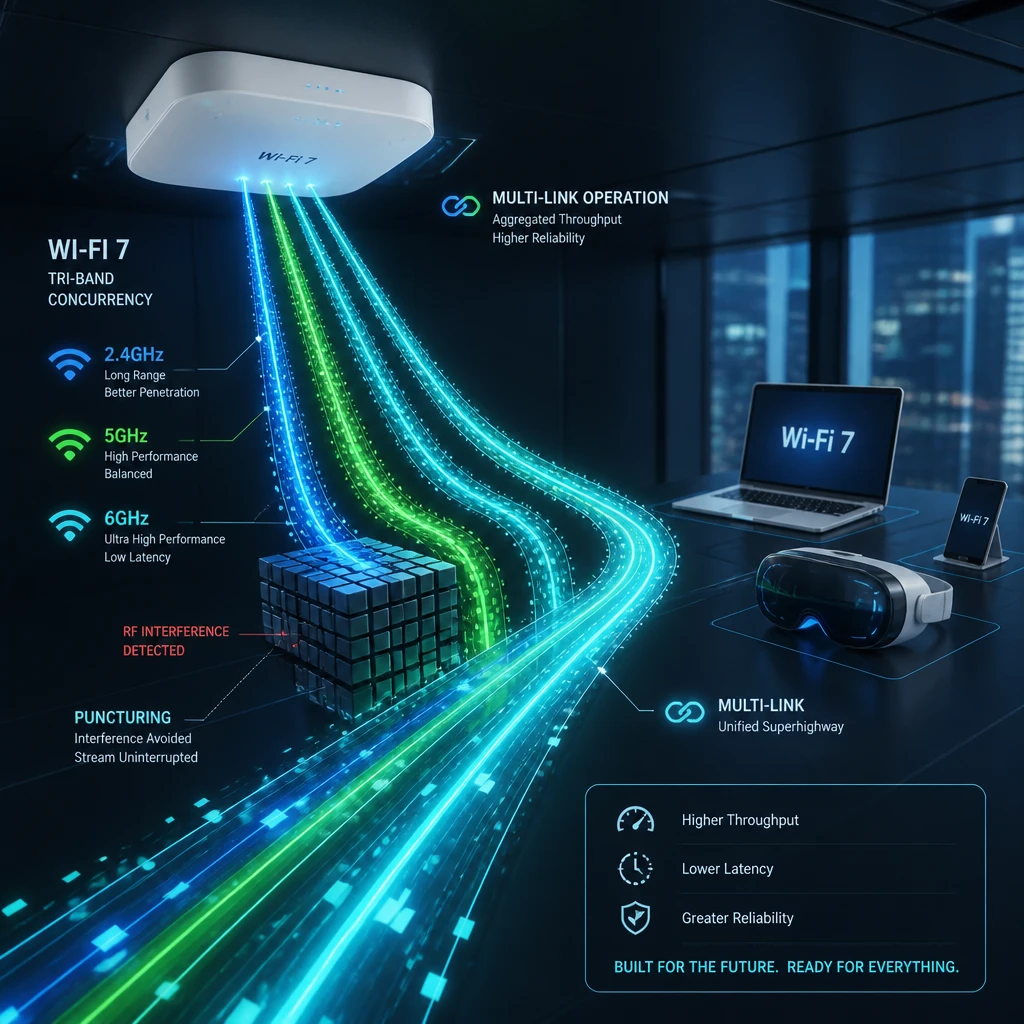 Figure 1: Conceptual visualization of Wi-Fi 7 Multi-Link Operation (MLO) handling continuous data streams.
The 320 MHz channel reality check
The number that makes headlines in Wi-Fi 7 is the 46 Gbps theoretical maximum, which flows primarily from the introduction of 320 MHz channel widths in the 6 GHz band. In practice, a real client device in a real building will top out somewhere between 2 and 5 Gbps under good conditions with a high-end Wi-Fi 7 AP, which is still genuinely impressive but not the number on the box.
More importantly for enterprise channel planning, the 320 MHz width comes with constraints that make it a niche tool rather than a default configuration. In the United States, the entire 6 GHz Wi-Fi allocation gives you 1,200 MHz of spectrum to work with. Three non-overlapping 320 MHz channels fit inside that with almost no margin to spare. In the European Union, the licensed portion of 6 GHz available for Wi-Fi is narrower, and you cannot fit even one non-overlapping 320 MHz channel. EU deployments are limited to 160 MHz regardless of what the hardware supports.
For a typical enterprise deployment with multiple APs covering a floor, 320 MHz channels create co-channel interference problems that eat into the throughput gains you were trying to achieve by going wide in the first place. The practical default for dense enterprise 6 GHz deployments is 80 MHz with careful channel reuse planning, stepping up to 160 MHz in zones where client density is lower and physical separation between APs is greater. The 320 MHz option is legitimate for point-to-point backhaul, isolated high-bandwidth zones like a broadcast studio or a video production floor, or low-density environments where you have the luxury of spreading APs far apart. It’s not a setting to default to and call it a day.
Preamble puncturing deserves more credit than it gets
The Wi-Fi 7 feature that most enterprise network engineers will probably feel the most in day-to-day operations isn’t MLO or 320 MHz channels — it’s preamble puncturing, and it tends to get buried under the flashier headline features.
Here’s the problem it solves. Wide channels are theoretically great, but they’re sensitive to interference because they span a lot of spectrum. A 160 MHz channel that runs into interference on a single 20 MHz slice of it is, under previous Wi-Fi generations, forced to step down to a narrower primary channel. The result is that you were operating on 160 MHz, something interfered with one 20 MHz chunk, and suddenly you’ve lost a huge fraction of your available bandwidth in a single event. In dense urban deployments, hospital environments, or manufacturing floors with a lot of legacy wireless equipment running around, this happened constantly and it was a real reason why wide channels didn’t deliver what they promised in production.
Preamble puncturing, which is mandatory for Wi-Fi 7 certification on channel widths of 80 MHz and above, changes this by letting the AP surgically exclude just the affected 20 MHz sub-channel from the transmission while continuing to use everything else. The interference is masked in the frame header so the client knows to ignore that slice during demodulation, and the rest of the channel remains fully active. You lose throughput proportional to the excluded spectrum rather than losing everything above the interference point.
For enterprise environments with challenging RF, this is a meaningful operational improvement. Instead of designing channel plans around the assumption that anything wide will get stepped down in practice, you can actually expect wide channels to hold in environments where the 6 GHz band isn’t perfectly clean. That changes the ROI math on Wi-Fi 7 in a hospital wing or a warehouse considerably.
The 4096-QAM piece, put in perspective
Rounding out the physical layer changes, Wi-Fi 7 raises the maximum modulation from 1024-QAM to 4096-QAM, which packs 12 bits per symbol instead of 10 — roughly a 20% increase in raw data density. It’s a real improvement but the smallest of the three headline features, and it has demanding signal quality requirements that limit where it actually activates. Getting 4096-QAM to engage requires a signal-to-noise ratio around 42 dB at the client. For reference, 1024-QAM in Wi-Fi 6 needed about 31 dB. That extra 11 dB is substantial in a real environment, and practically it means 4096-QAM only kicks in when a client is relatively close to the AP with a solid signal and minimal interference.
In a large open office or a warehouse, the majority of connected devices won’t hit that threshold consistently. 4096-QAM will matter for clients sitting near APs in conference rooms and enclosed spaces, and it’s worth having it available. But if someone asks why they should upgrade to Wi-Fi 7, leading with 4096-QAM is not the honest answer. It also happens to be the one feature that’s optional for Wi-Fi 7 certification, unlike MLO and preamble puncturing, so not every device wearing the Wi-Fi 7 badge will actually support it.
Where the upgrade is easy to justify and where it isn’t
By mid-2026 there are enough real enterprise deployments in production to have a clear picture of where Wi-Fi 7 pays for itself and where it doesn’t.
High-density environments are the obvious case. Auditoriums, conference centers, large open training floors, and campus gathering spaces where you’re regularly managing hundreds of concurrent clients per AP are exactly the scenario Wi-Fi 7 was engineered to handle better than 6E. MLO’s ability to distribute traffic across bands without re-association keeps real-time applications running clean under load, and the improved OFDMA scheduling handles the high device count more efficiently. Deployments running heavy video conferencing at scale, logistics facilities with handheld scanner density pushing 802.11ax’s limits, and any environment doing meaningful AR or VR work are in the same bucket.
Healthcare is the other environment where Wi-Fi 7 earns its place quickly. Not because hospital devices need 5 Gbps, but because the RF environment in a hospital building is legitimately hostile — medical equipment, dense Bluetooth device populations, aging building infrastructure that creates reflection and attenuation challenges — and preamble puncturing gives Wi-Fi 7 APs the tools to stay on wide channels in those conditions rather than constantly stepping down. Consistent, predictable wireless is a patient safety issue in clinical environments, and anything that improves consistency is worth taking seriously.
The harder argument to make is for standard office deployments that already have a healthy Wi-Fi 6 or 6E installation. If the network is working well, most users are on routine SaaS and collaboration tools, and you haven’t actually hit a density or throughput ceiling, the upgrade is buying headroom you’re not going to use in the near term. The capital is better deployed where the current infrastructure is actually constrained.
Infrastructure things to check before you commit
A Wi-Fi 7 AP running MLO across two or three bands simultaneously can generate aggregate uplink traffic that a 1 Gbps switch port can’t absorb. The better enterprise-grade Wi-Fi 7 hardware ships with 2.5 GbE or multi-gigabit uplinks for exactly this reason, and if your access layer switches were deployed at 1G, those APs are going to hit a ceiling on the wire side before they ever hit one on the wireless side. Auditing your access layer uplink capacity before committing to a Wi-Fi 7 refresh is worth doing — the switch upgrade in some buildings ends up being the bigger line item.
Power is the other thing to check. Full-featured tri-band Wi-Fi 7 APs with the radios and processing to run MLO properly draw more power than their Wi-Fi 6E predecessors, and many of them require 802.3bt PoE++ rather than the 802.3at PoE+ that most existing switch infrastructure delivers. If your switches were deployed five or six years ago, checking the PoE budget per port before finalizing AP selection will save you an unpleasant discovery during installation.
For any deployment involving outdoor coverage or high-power indoor operation in the 6 GHz band, the Automated Frequency Coordination system becomes relevant. Standard Power mode requires the AP to query an AFC database that cross-references its GPS coordinates against licensed fixed microwave users in the area before it can use higher transmit power. AFC is operational in the US as of 2026, but vendor firmware support and provisioning workflows vary enough that it’s worth confirming explicitly with your AP vendor if outdoor 6 GHz coverage is part of your design.
Where this leaves the decision
Wi-Fi 7 is the most technically substantive generational update since Wi-Fi 6 introduced OFDMA and MU-MIMO improvements that actually mattered for enterprise scale. MLO is a real architectural change, not a repackaged version of something that existed before, and preamble puncturing addresses a practical limitation that has made wide-channel operation unreliable in production environments for years. The ecosystem in 2026 is mature enough — enterprise AP options from Cisco, Aruba, Juniper, and Arista are all shipping stable hardware — that you’re not taking on early-adopter risk if you move forward now.
The decision just needs to be honest about what problem you’re solving. If your environment is constrained in the ways Wi-Fi 7 was designed to address — density, real-time application reliability, difficult RF — it’s a clear upgrade. If you’re replacing infrastructure that’s functionally working because the generation number changed, you’re spending money to feel current rather than to fix anything. Those are two very different projects, and it’s worth being clear which one you’re actually proposing.